Learning Go: MongoDB CRUD with gRPC

Go
The last couple of weeks I’ve been busy with my new favorite toy: Go. It is an open source programming language created at google in 2007. It is heavily used at Google and has been battle tested before a public release and by now, is considered to be a very stable language. Go tries to find a middle ground between humans and machines for optimal productivity and performance. Many believe it to be the future of back-end development and micro-services.
While Go is still relatively young, it has been welcomed with open arms in the distributed systems world. Docker, Kubernetes, InfluxDB, Go-Ethereum, … are all built in Go.
Here’s the classical “Why Go?” list:
- Elegant concurrency using GoRoutines and Channels
- Multi-core support
- Very good raw CPU-and-memory-bound performance
- Types aren’t cumbersome
- Built in testing framework
- Static code analysis
- Compilation / deployment
In this blog I will not teach you how to write “Hello World” in go, instead we’ll write a CRUD API using the official mongodb-go-driver and gRPC. Before continuing make sure you have Golang, MongoDB, RoboMongo (for ease of use) and Protocol Buffers (link is below) installed. To get the most out of this tutorial you should be familiar with Go syntax a little bit as well as pointers.

gRPC & HTTP2
REST in peace, there’s a new kid on the block and it’s called gRPC.
gRPC is a modern, HTTP2 based protocol that provides Remote Procedure Call semantics using a strongly-typed binary data format called Protocol Buffers instead of JSON.
Parsing JSON is very CPU intensive and it is estimated that it takes up 45% of all CPU resources for RESTful services. Combined with the upgrades HTTP/2 offers, gRPC API’s are estimated to be 5–25x faster than their RESTful counterpart.
gRPC was built from the ground up to leverage all the good stuff coming with HTTP/2 and has been battle-tested by Google yet again, handling 10 billion requests per second. Here’s a list of fun stuff that HTTP/2 brings to the table:
- Multiplexing (HTTP/1 opens a TCP connection for every request)
- Server Push
- Header compression (plaintext in HTTP/1 and sent with every request)
- Binary instead of Text (Great match for Protocol Buffers)
- SSL is a first class citizen
gRPC vs REST
Fully comparing gRPC to REST would be material for a blog post on its own, so here’s an overview:
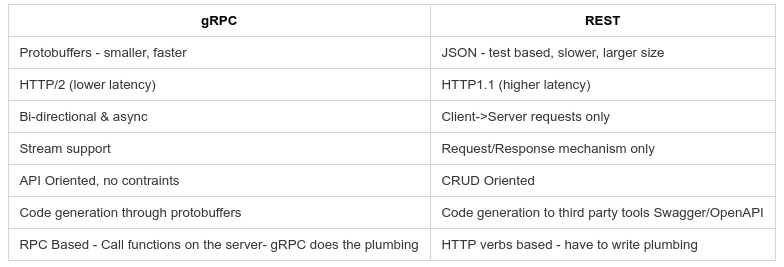
Protocol Buffers
Like mentioned before Protocol Buffers (protobufs in short) are a strongly-typed, language- and platform neutral, binary data format. You can define how you want your data to be structured once in a .proto file and then use special generated source code to easily create server and client stubs for many languages, your .proto file is the canonical format for API contracts. According to google, protobufs are 3–10x smaller than XML and 20–100x faster.
Protocol Buffers are used to defined messages (data, requests and responses) and services (RPC endpoints) in .proto files.
To learn more about protocol buffers, please check the extensive documentation.
Down To Business: Blog Service API
For the remainder of this blog post we will be building a simple CRUD API for a blog service. Since MongoDB just released their official Go driver, we’ll be using MongoDB. We’ll create a server and a small CLI application for the client using Cobra. Let’s get our hands dirty !
- Cobra does not yet support go-modules for generating subcommands, thus for this tutorial we’ll be using good ol’ $GOPATH :) .
- This is what your folder structure should look like:
$GOPATH/grpc-mongo-crud/
- server
- client
- proto - Alternatively you could just generate the subcommand files in your $GOPATH and copy-paste the code into your own repository and use relative paths instead (this is the route I took).
You can find the code repository on my github.

1. Creating a Proto file
After setting up a new working directory in your $GOPATH, create a new file in the proto folder, let’s call it blog.proto. For simplicity we’ll create seperate messages for each request/response altough some will overlap.
First a little bit of boilerplate that expresses we use protbufs v3, our package is called blog, and our generate go package will be called blogpb (short for blog protocol buffer).
syntax = "proto3";
package blog;
option go_package = "blogpb";We’ll need 5 services, each service takes in a request and returns a response:
- CreateBlog (unary)
- ReadBlog (unary)
- UpdateBlog (unary)
- DeleteBlog (unary)
- ListBlog (server streaming)
service BlogService {
    rpc CreateBlog(CreateBlogReq) returns (CreateBlogRes);
    rpc ReadBlog(ReadBlogReq) returns (ReadBlogRes);
    rpc UpdateBlog(UpdateBlogReq) returns (UpdateBlogRes);
    rpc DeleteBlog(DeleteBlogReq) returns (DeleteBlogRes);
    rpc ListBlogs(ListBlogReq) returns (stream ListBlogRes);
}CreateBlog, ReadBlog and UpdateBlog will return a Blog item in their responses, so we’ll need a Blog Message Type. Messages can be nested, so we can use our Blog Message inside Request/Response messages.
message Blog {
    string id = 1;
    string author_id = 2;
    string title = 3;
    string content= 4;
}CreateBlog Request / Response
Both the request and response will consist out of a Blog message, the main difference being that in the request, the ID will be blank as that is created by MongoDB upon creation of the document inside the database. In the response the ID will be filled in.
message CreateBlogReq {
    Blog blog = 1; // Blog id blank
}

message CreateBlogRes {
    Blog blog = 1; // Blog id filled in
}UpdateBlog Request / Response
Very similar to CreateBlog, but the Blog message in our Request will already contain the id to find and update that specific item in our database. The response will return the updated document.
message UpdateBlogReq {
    Blog blog = 1;
}

message UpdateBlogRes {
    Blog blog = 1;
}ReadBlog Request / Response
We’ll keep this straightforward and make Blogs searchable by Id only. It is possible though to use id OR title in a single request message using oneof .
message ReadBlogReq {
    string id = 1;
}

message ReadBlogRes {
    Blog blog = 1;
}DeleteBlog Request / Response
The request object is identical to ReadBlog, we find the blog by id and remove it (oneof can be used here too). On success we return true otherwise an error is returned.
message DeleteBlogReq {
    string id = 1;
}

message DeleteBlogRes {
    bool success = 1;
}ListBlogs Request/Response
This one is special, ListBlogs will list all blogs in our database. All our previous services were unary , which means they adhere to the classic request/response mechanism. It works fine when the data is small, but for large data streaming is more optimal. ListBlogs will use server-streaming; for one request message the server will send back multiple blog messages.
message ListBlogsRequest {}

message ListBlogsResponse {
    Blog blog = 1;
}Protocol Compiler: Protoc
Now that we have created our .proto definitions it is time to generate our Client and Server stubs in Go. We do this using the protocol buffer compiler combined with the protoc-gen-go plugin.
You can check whether the installation was successful:
$ protoc — version
libprotoc 3.7.1
If it is you can compile your proto file to Go stubs, this will result in a new file in the /proto folder: blog.pb.go
protoc proto/blog.proto --go_out=plugins=grpc:.
I suggest you go through the newly generated file, you’ll see types and interfaces for the server and client, methods to create a new server and client, types to instantiate (requests, responses and blog) and getters for the fields of those structs.
You will also see this line at the top of the file, please take it to heart:
// Code generated by protoc-gen-go. DO NOT EDIT.
2. Server Implementation
Starting / Stopping the server
First things first, we’ll need some boilerplate to create a gRPC server and mongoDB connection, give some feedback to the console and handle server shutdowns by the user through a shutdown hook.
We’ll set all of this up within our main() function, feel free to do some code splitting and cleanup by yourself.
- Add filename and linenumber flags when we use the log package
- Start our listener
- Start a new gRPC server with no service registered yet.
- Create a blog service and register it to our new gRPC server.
- Connect to MongoDB.
- Accept incoming connections on our listener
- Handle user initiated server shutdown (CTRL+C)
Now let’s start creating our main() function.
func main() {
	// Configure 'log' package to give file name and line number on eg. log.Fatal
	// Pipe flags to one another (log.LstdFLags = log.Ldate | log.Ltime)
	log.SetFlags(log.LstdFlags | log.Lshortfile)
	fmt.Println("Starting server on port :50051...")

	// Start our listener, 50051 is the default gRPC port
	listener, err := net.Listen("tcp", ":50051")
	// Handle errors if any
	if err != nil {
		log.Fatalf("Unable to listen on port :50051: %v", err)
	}
}Now let’s start a new gRPC server and register our Blog service. To achieve this we’ll use the grpc package as well as the blogpb package created by compiling our .proto file. Our blogpb package has a method called RegisterBlogServiceServer that takes in a pointer to a fresh gRPC server and a BlogServiceServer struct that adheres to the BlogServiceServer interface from our generated blog.pb.go file.
import (
  // other imports ...
  blogpb "../proto"
  // ...
)

type BlogServiceServer struct {}

func main() {
 // STEP 1 & STEP 2
 // ...

 // Set options, here we can configure things like TLS support
 opts := []grpc.ServerOption{}
 // Create new gRPC server with (blank) options
 s := grpc.NewServer(opts...)
 // Create BlogService type
 srv := &BlogServiceServer{}
 // Register the service with the server
 blogpb.RegisterBlogServiceServer(s, srv)
}Great job ! Now well create our mongodb connection, so make sure you have MongoDB installed as well as the official mongodb-go-driver we’ll be using. If you’ve ever worked with a mongodb driver in another language, you’ll see that it’s quite similar.
// Global variables for db connection , collection and context
var db *mongo.Client
var blogdb *mongo.Collection
var mongoCtx context.Context

func main {
  // STEP 1 & STEP 2
  // STEP 3 (gRPC server)
  // ...

  // Initialize MongoDb client
	fmt.Println("Connecting to MongoDB...")

  // non-nil empty context
	mongoCtx = context.Background()

  // Connect takes in a context and options, the connection URI is the only option we pass for now
	db, err = mongo.Connect(mongoCtx, options.Client().ApplyURI("mongodb://localhost:27017"))
  // Handle potential errors
	if err != nil {
		log.Fatal(err)
	}

  // Check whether the connection was succesful by pinging the MongoDB server
	err = db.Ping(mongoCtx, nil)
	if err != nil {
		log.Fatalf("Could not connect to MongoDB: %v\n", err)
	} else {
		fmt.Println("Connected to Mongodb")
	}

  // Bind our collection to our global variable for use in other methods
	blogdb = db.Database("mydb").Collection("blog")
}Last but not least we’ll serve the listener to accept incoming connections and handle proper server shutdown using a goroutine and channel to block the main channel until the user presses CTRL+C.
func main() {
  // STEP 1, STEP 2, STEP 3
  // ...

  // Start the server in a child routine
	go func() {
		if err := s.Serve(listener); err != nil {
			log.Fatalf("Failed to serve: %v", err)
		}
	}()
	fmt.Println("Server succesfully started on port :50051")

	// Right way to stop the server using a SHUTDOWN HOOK
	// Create a channel to receive OS signals
	c := make(chan os.Signal)

	// Relay os.Interrupt to our channel (os.Interrupt = CTRL+C)
	// Ignore other incoming signals
	signal.Notify(c, os.Interrupt)

	// Block main routine until a signal is received
	// As long as user doesn't press CTRL+C a message is not passed and our main routine keeps running
	<-c

	// After receiving CTRL+C Properly stop the server
	fmt.Println("\nStopping the server...")
	s.Stop()
	listener.Close()
	fmt.Println("Closing MongoDB connection")
	db.Disconnect(mongoCtx)
	fmt.Println("Done.")
}And we’re done! You can now start the server running go run server/main.go , make sure however to run sudo service mongod start beforehand, or db.Ping() will return an error. You can then close the server by pressing CTRL+C.
If all went well you should see something like:
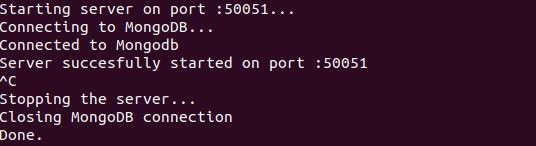
** Note: You’ll likely need to add empty methods from the next section to not get compile errors, since BlogServiceServer does not adhere to it’s interface (in blog.pb.go) yet.
Creating our Proto Service Handlers
Now that we have our server ready, it’s time to add methods for the services we defined in our .proto file. The methods will take our BlogServiceServer as receiver so it will comply with its interface.
type BlogServiceServer interface {
	CreateBlog(context.Context, *CreateBlogReq) (*CreateBlogRes, error)
	ReadBlog(context.Context, *ReadBlogReq) (*ReadBlogRes, error)
	UpdateBlog(context.Context, *UpdateBlogReq) (*UpdateBlogRes, error)
	DeleteBlog(context.Context, *DeleteBlogReq) (*DeleteBlogRes, error)
	ListBlogs(*ListBlogsReq, BlogService_ListBlogsServer) error
}In the function bodies we’ll generally use the following workflow:
Protbuf Message (Request) → Regular Go Struct → Convert to BSON + Mongo Action → Protobuf Message (Response)
What’s currently missing is the regular go struct to represent a blog, which can be converted to BSON. So let’s create this type above the main function and add some tags, so that the bson package will use the meta information to assign keys.
type BlogItem struct {
	ID       primitive.ObjectID `bson:"_id,omitempty"`
	AuthorID string             `bson:"author_id"`
	Content  string             `bson:"content"`
	Title    string             `bson:"title"`
}

func main() { ... }Now let’s make our CreateBlog method. It takes in a context and a request, in this case CreateBlogReq. First we’ll extract the Blog message from our request message and convert it to a regular go struct. InsertOne() will convert it into BSON for us, using the meta tags we provided. The result from InsertOne() returns the Object ID of the new document inside our collection, which we can then add to our Blog protobuf message to be wrapped in a CreateBlogResponse.
func (s *BlogServiceServer) CreateBlog(ctx context.Context, req *blogpb.CreateBlogReq) (*blogpb.CreateBlogRes, error) {
	// Essentially doing req.Blog to access the struct with a nil check
	blog := req.GetBlog()
	// Now we have to convert this into a BlogItem type to convert into BSON
	data := BlogItem{
		// ID:    Empty, so it gets omitted and MongoDB generates a unique Object ID upon insertion.
		AuthorID: blog.GetAuthorId(),
		Title:    blog.GetTitle(),
		Content:  blog.GetContent(),
	}

	// Insert the data into the database, result contains the newly generated Object ID for the new document
	result, err := blogdb.InsertOne(mongoCtx, data)
	// check for potential errors
	if err != nil {
		// return internal gRPC error to be handled later
		return nil, status.Errorf(
			codes.Internal,
			fmt.Sprintf("Internal error: %v", err),
		)
	}
  // add the id to blog, first cast the "generic type" (go doesn't have real generics yet) to an Object ID.
	oid := result.InsertedID.(primitive.ObjectID)
  // Convert the object id to it's string counterpart
	blog.Id = oid.Hex()
	// return the blog in a CreateBlogRes type
	return &blogpb.CreateBlogRes{Blog: blog}, nil
}Next we’ll do ReadBlog(), the ReadBlogReq will take in the Object ID of the blog and retrieve that document from our collection. The MongoDB FindOne() methods takes in a context and a filter, which is a BSON document for which to filter by its keys. We’ll simply have to decode the found document to a regular go struct so we can convert it back to protobuffer messages.
func (s *BlogServiceServer) ReadBlog(ctx context.Context, req *blogpb.ReadBlogReq) (*blogpb.ReadBlogRes, error) {
	// convert string id (from proto) to mongoDB ObjectId
	oid, err := primitive.ObjectIDFromHex(req.GetId())
	if err != nil {
		return nil, status.Errorf(codes.InvalidArgument, fmt.Sprintf("Could not convert to ObjectId: %v", err))
	}
	result := blogdb.FindOne(ctx, bson.M{"_id": oid})
	// Create an empty BlogItem to write our decode result to
	data := BlogItem{}
	// decode and write to data
	if err := result.Decode(&data); err != nil {
		return nil, status.Errorf(codes.NotFound, fmt.Sprintf("Could not find blog with Object Id %s: %v", req.GetId(), err))
	}
	// Cast to ReadBlogRes type
	response := &blogpb.ReadBlogRes{
		Blog: &blogpb.Blog{
			Id:       oid.Hex(),
			AuthorId: data.AuthorID,
			Title:    data.Title,
			Content:  data.Content,
		},
	}
	return response, nil
}Now that we can create and read a blog, we should also be able to delete one. For DeleteBlog we’ll use the mongodb DeleteOne() method, which takes in an Object ID of the document to remove. If the removal is succesful we’ll return a boolean else an error.
func (s *BlogServiceServer) DeleteBlog(ctx context.Context, req *blogpb.DeleteBlogReq) (*blogpb.DeleteBlogRes, error) {
	// Get the ID (string) from the request message and convert it to an Object ID
	oid, err := primitive.ObjectIDFromHex(req.GetId())
	// Check for errors
	if err != nil {
		return nil, status.Errorf(codes.InvalidArgument, fmt.Sprintf("Could not convert to ObjectId: %v", err))
	}
	// DeleteOne returns DeleteResult which is a struct containing the amount of deleted docs (in this case only 1 always)
	// So we return a boolean instead
	_, err = blogdb.DeleteOne(ctx, bson.M{"_id": oid})
	// Check for errors
	if err != nil {
		return nil, status.Errorf(codes.NotFound, fmt.Sprintf("Could not find/delete blog with id %s: %v", req.GetId(), err))
	}
	// Return response with success: true if no error is thrown (and thus document is removed)
	return &blogpb.DeleteBlogRes{
		Success: true,
	}, nil
}For the last of our CRUD operations, we’ll need method to update a blog. For simplicity’s sake we are going to entirely replace the existing document inside the collection with the document encoded from our request. In a real-world scenario we’d do nil checks on the arguments so that only filled out fields are actually updated (using the $set keyword from MongoDB). The second quirk is that Mongo’s FindOneAndUpdate() returns the old document, so we’ll have to explicitly tell it to return the new document instead.
func (s *BlogServiceServer) UpdateBlog(ctx context.Context, req *blogpb.UpdateBlogReq) (*blogpb.UpdateBlogRes, error) {
	// Get the blog data from the request
	blog := req.GetBlog()

	// Convert the Id string to a MongoDB ObjectId
	oid, err := primitive.ObjectIDFromHex(blog.GetId())
	if err != nil {
		return nil, status.Errorf(
			codes.InvalidArgument,
			fmt.Sprintf("Could not convert the supplied blog id to a MongoDB ObjectId: %v", err),
		)
	}

	// Convert the data to be updated into an unordered Bson document
	update := bson.M{
		"authord_id": blog.GetAuthorId(),
		"title":      blog.GetTitle(),
		"content":    blog.GetContent(),
	}

	// Convert the oid into an unordered bson document to search by id
	filter := bson.M{"_id": oid}

	// Result is the BSON encoded result
	// To return the updated document instead of original we have to add options.
	result := blogdb.FindOneAndUpdate(ctx, filter, bson.M{"$set": update}, options.FindOneAndUpdate().SetReturnDocument(1))

	// Decode result and write it to 'decoded'
	decoded := BlogItem{}
	err = result.Decode(&decoded)
	if err != nil {
		return nil, status.Errorf(
			codes.NotFound,
			fmt.Sprintf("Could not find blog with supplied ID: %v", err),
		)
	}
	return &blogpb.UpdateBlogRes{
		Blog: &blogpb.Blog{
			Id:       decoded.ID.Hex(),
			AuthorId: decoded.AuthorID,
			Title:    decoded.Title,
			Content:  decoded.Content,
		},
	}, nil
}The last method we’ll implement, ListBlogs, is slightly different. Our previous operations were unary CRUD operations, which means they use a classical 1 response for 1 request mechanism.
If we want to list all blogs however, the data payload might grow too large to return it in one response, therefore we’ll implement server streaming through gRPC. For one request to list the blogs, the server will keep streaming blog messages until all blogs have been sent back to the client.
MongoDB is really helpful with this through it’s cursor feature. A cursor in MongoDB is a pointer to the results of a query rather than all of the results in memory.
A pointer to the result set of a query. Clients can iterate through a cursor to retrieve results.
So what we’ll do is iterate over the cursor using cursor.Next() and send each blog as message to the client, until the cursor yields no more results at which point we’ll close the server side stream. It’s more straightforward when you see the code:
func (s *BlogServiceServer) ListBlogs(req *blogpb.ListBlogsReq, stream blogpb.BlogService_ListBlogsServer) error {
	// Initiate a BlogItem type to write decoded data to
	data := &BlogItem{}
	// collection.Find returns a cursor for our (empty) query
	cursor, err := blogdb.Find(context.Background(), bson.M{})
	if err != nil {
		return status.Errorf(codes.Internal, fmt.Sprintf("Unknown internal error: %v", err))
	}
	// An expression with defer will be called at the end of the function
	defer cursor.Close(context.Background())
	// cursor.Next() returns a boolean, if false there are no more items and loop will break
	for cursor.Next(context.Background()) {
		// Decode the data at the current pointer and write it to data
		err := cursor.Decode(data)
		// check error
		if err != nil {
			return status.Errorf(codes.Unavailable, fmt.Sprintf("Could not decode data: %v", err))
		}
		// If no error is found send blog over stream
		stream.Send(&blogpb.ListBlogsRes{
			Blog: &blogpb.Blog{
				Id:       data.ID.Hex(),
				AuthorId: data.AuthorID,
				Content:  data.Content,
				Title:    data.Title,
			},
		})
	}
	// Check if the cursor has any errors
	if err := cursor.Err(); err != nil {
		return status.Errorf(codes.Internal, fmt.Sprintf("Unkown cursor error: %v", err))
	}
	return nil
}Well done, that’s it for our entire server implementation. You’re on the path to becoming a supergopher ! Next we’ll start working on our CLI client application using Cobra.

3. Client Implementation
Cobra
As mentioned earlier, we’ll be making a CLI application for our client using Cobra. It comes with a handy generator to generate boilerplate for us.
The cobra generator doesn’t work with go modules yet, so we’ll generate the command files in our $GOPATH and then copy paste them into our /client folder where we are creating our project (if you started in your $GOPATH from the start, you can run the generator from the /client folder).
First things first, install cobra. This will create an executable in $GOPATH/bin that we can run from anywhere in the terminal (if you have setup Go correctly).
$ go get github.com/spf13/cobra/cobra
Once Cobra is successfully installed, we can initiate a new project.
$ cobra init
This will generate a main.go file and a /cmd folder. The main.go file doesn’t do anything aside from calling execute on the root command, located in /cmd/root.go .
Two things in /cmd/root.go are important to us, the rootCmd struct (a cobra.Command type), which contains the command name and descriptions and the init() function , where we’ll initiate the client. Since sub-commands are bound to the root command, Cobra will always initiate a client before executing the sub-command.
Give your root command a name and some descriptions:
// rootCmd represents the base command when called without any subcommands
var rootCmd = &cobra.Command{
	Use:   "blogclient",
	Short: "a gRPC client to communicate with the BlogService server",
	Long: `a gRPC client to communicate with the BlogService server.
	You can use this client to create and read blogs.`,
}And initialize the client:
var cfgFile string

// Client and context global vars for the cmd package
// So they can be used by our subcommands
var client blogpb.BlogServiceClient
var requestCtx context.Context
var requestOpts grpc.DialOption

func init() {
  // initConfig reads in config file and ENV variables
	cobra.OnInitialize(initConfig)
	// After Cobra root config init, initialize the client
	fmt.Println("Starting Blog Service Client")
	// Establish context to timeout after 10 seconds if server does not respond
	requestCtx, _ = context.WithTimeout(context.Background(), 10*time.Second)
	// Establish insecure grpc options (no TLS)
	requestOpts = grpc.WithInsecure()
	// Dial the server, returns a client connection
	conn, err := grpc.Dial("localhost:50051", requestOpts)
	if err != nil {
		log.Fatalf("Unable to establish client connection to localhost:50051: %v", err)
	}
	// Instantiate the BlogServiceClient with our client connection to the server
	client = blogpb.NewBlogServiceClient(conn)
}
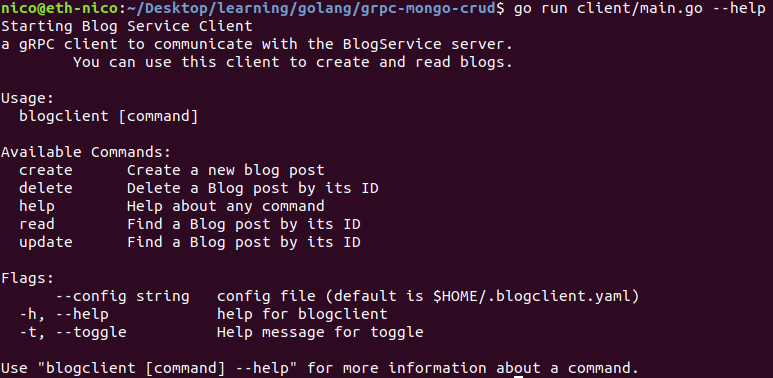
I’m not kidding if I say that was the hardest part of our client, pretty straightforward right? Feel free to play around with Cobra by adding flags or commands, you also have “help” flag out of the box. In our finished application it will look something like this when called:
Create Blog Command
Now that our root command is set up, let’s create our first sub-command so that we can actually add blogs to our database.
$ cobra add create
This will create a new file, /cmd/create.go with roughly the same layout as root.go . There’s a struct of type cobra.Command and an init() function.
In the init() function we’ll define our flags. Every blog entry needs an author, title and content so let’s make those flags required as well. To add a flag we first need the Flagset for that command, with StringP(name, shorthand, defaultVal, description) we can add a flag that has a shorthand (eg. ‘a’ for ‘author’). At the end of the init() function we bind our sub-command to the root.
func init() {
	createCmd.Flags().StringP("author", "a", "", "Add an author")
	createCmd.Flags().StringP("title", "t", "", "A title for the blog")
	createCmd.Flags().StringP("content", "c", "", "The content for the blog")
	createCmd.MarkFlagRequired("author")
	createCmd.MarkFlagRequired("title")
	createCmd.MarkFlagRequired("content")
	rootCmd.AddCommand(createCmd)
}To run a method associated with the create command, our cobra.Command struct will take an additional property RunE. This allows us to execute a method that returns an error, because remember we’re returning internal gRPC errors. The Flagset associated with the command (command.Flags() ) allows us to easily retrieve the arguments given to the flags.
Out of these flags we can then create our request, CreateBlogReq and call the CreateBlog method on the client. Under the hood this will send the RPC request on the wire and return a response.
// createCmd represents the create command
var createCmd = &cobra.Command{
	Use:   "create",
	Short: "Create a new blog post",
	Long: `Create a new blogpost on the server through gRPC.

	A blog post requires an AuthorId, Title and Content.`,
	RunE: func(cmd *cobra.Command, args []string) error {
    // Get the data from our flags
		author, err := cmd.Flags().GetString("author")
		title, err := cmd.Flags().GetString("title")
		content, err := cmd.Flags().GetString("content")
		if err != nil {
			return err
		}
    // Create a blog protobuffer message
		blog := &blogpb.Blog{
			AuthorId: author,
			Title:    title,
			Content:  content,
		}
    // RPC call
		res, err := client.CreateBlog(
			context.TODO(),
      // wrap the blog message in a CreateBlog request message
			&blogpb.CreateBlogReq{
				Blog: blog,
			},
		)
		if err != nil {
			return err
		}
		fmt.Printf("Blog created: %s\n", res.Blog.Id)
		return nil
	},
}Read Blog Command
That’s pretty easy right? Let’s continue with something even easier and more straightforward, especially now that you’re getting the hang of it! A command to read a blog; this will take in a single flag, the blog Object Id.
Similar to the init() function for our create command, we’ll create our flag for the id and bind the sub-command to our root.
func init() {
	readCmd.Flags().StringP("id", "i", "", "The id of the blog")
	readCmd.MarkFlagRequired("id")
	rootCmd.AddCommand(readCmd)
}And in our command struct we’ll set the appropriate name and description. Our runE method will be similar as well. We’ll retrieve the id from the flagset, create our request (ReadBlogReq) out of it and invoke the RPC call.
var readCmd = &cobra.Command{
	Use:   "read",
	Short: "Find a Blog post by its ID",
	Long: `Find a blog post by it's mongoDB Unique identifier.

	If no blog post is found for the ID it will return a 'Not Found' error`,
	RunE: func(cmd *cobra.Command, args []string) error {
		id, err := cmd.Flags().GetString("id")
		if err != nil {
			return err
		}
		req := &blogpb.ReadBlogReq{
			Id: id,
		}
		res, err := client.ReadBlog(context.Background(), req)
		if err != nil {
			return err
		}
		fmt.Println(res)
		return nil
	},
}Update Blog Command
Updating a blog is nearly identical on the client as creating a blog, with the addition of the id flag, because we need to tell mongoDB which document to update of course. Let’s call cobra add update and edit the generated file.
var updateCmd = &cobra.Command{
	Use:   "update",
	Short: "Find a Blog post by its ID",
	Long: `Find a blog post by it's mongoDB Unique identifier.

	If no blog post is found for the ID it will return a 'Not Found' error`,
	RunE: func(cmd *cobra.Command, args []string) error {
		// Get the flags from CLI
		id, err := cmd.Flags().GetString("id")
		author, err := cmd.Flags().GetString("author")
		title, err := cmd.Flags().GetString("title")
		content, err := cmd.Flags().GetString("content")

		// Create an UpdateBlogRequest
		req := &blogpb.UpdateBlogReq{
			&blogpb.Blog{
				Id:       id,
				AuthorId: author,
				Title:    title,
				Content:  content,
			},
		}

		res, err := client.UpdateBlog(context.Background(), req)
		if err != nil {
			return err
		}

		fmt.Println(res)
		return nil
	},
}

func init() {
	updateCmd.Flags().StringP("id", "i", "", "The id of the blog")
	updateCmd.Flags().StringP("author", "a", "", "Add an author")
	updateCmd.Flags().StringP("title", "t", "", "A title for the blog")
	updateCmd.Flags().StringP("content", "c", "", "The content for the blog")
	updateCmd.MarkFlagRequired("id")
	rootCmd.AddCommand(updateCmd)
}Delete Blog Command
Similar to the read command, this command takes a single flag, the blog id and removes it from the database. The code is nearly identical apart from the invoked client method.
var deleteCmd = &cobra.Command{
	Use:   "delete",
	Short: "Delete a Blog post by its ID",
	Long: `Delete a blog post by it's mongoDB Unique identifier.

	If no blog post is found for the ID it will return a 'Not Found' error`,
	RunE: func(cmd *cobra.Command, args []string) error {
		id, err := cmd.Flags().GetString("id")
		if err != nil {
			return err
		}
		req := &blogpb.DeleteBlogReq{
			Id: id,
		}
		// We only return true upon success for other cases an error is thrown
		// We can thus omit the response variable for now and just print something to console
		_, err = client.DeleteBlog(context.Background(), req)
		if err != nil {
			return err
		}
		fmt.Printf("Succesfully deleted the blog with id %s\n", id)
		return nil
	},
}

func init() {
	deleteCmd.Flags().StringP("id", "i", "", "The id of the blog")
	deleteCmd.MarkFlagRequired("id")
	rootCmd.AddCommand(deleteCmd)
}
List Blogs Command
This one will be slightly different, because if you remember it’s a RPC method that uses server side streaming. Calling ListBlogs will return a grpc client stream. If you wish to know more about this I suggest you check out the interface for it in the gRPC package. But essentially to list all blogs we’ll loop until we reach the end of the stream.
// listCmd represents the read command
var listCmd = &cobra.Command{
	Use:   "list",
	Short: "List all blog posts",
	RunE: func(cmd *cobra.Command, args []string) error {
		// Create the request (this can be inline below too)
		req := &blogpb.ListBlogsReq{}
		// Call ListBlogs that returns a stream
		stream, err := client.ListBlogs(context.Background(), req)
		// Check for errors
		if err != nil {
			return err
		}
		// Start iterating
		for {
			// stream.Recv returns a pointer to a ListBlogRes at the current iteration
			res, err := stream.Recv()
			// If end of stream, break the loop
			if err == io.EOF {
				break
			}
			// if err, return an error
			if err != nil {
				return err
			}
			// If everything went well use the generated getter to print the blog message
			fmt.Println(res.GetBlog())
		}
		return nil
	},
}

func init() {
	rootCmd.AddCommand(listCmd)
}4. Finishing Up
It’s been a long road, but we’re at the finish line. Now you can actually start playing with the CLI application you made. If you’ve been working from your $GOPATH you can go install the CLI app and use the root command directly from the terminal. Otherwise you can call commands like so:
go run client/main.go create -a “Nico Vergauwen” -t “Learning Go” -c “The quick brown fox jumps over the lazy dog”
And that’s it , you’re well on your way to become a king at Go and gRPC ! Thank you for reading, I hope you enjoyed it!

Originally published on ITNEXT on 10 May 2019.